01
Product families
Content for sanitaryware, furniture, finishes, equipment and other product ranges.
Examplea sanitaryware range with every size and finish.
For manufacturers and product brands
We turn your catalogue into Revit families that designers can find, download and use in their projects.
WHAT WE CAN BUILD
A manufacturer library links product geometry to technical information. We organise that information so your products are easy to use in Revit.
Content for sanitaryware, furniture, finishes, equipment and other product ranges.
Examplea sanitaryware range with every size and finish.
Dimensions, materials and variants structured around the characteristics of each range.
Exampleone Revit type per product code, with the right dimensions and material.
Product codes, descriptions and properties aligned with the manufacturer's data.
Exampleproduct code, manufacturer, description and a data sheet link inside the family.
Organised files to publish on your website or build into your catalogue experience.
Examplea ZIP for your website, or a library to use with Family Library.
Geometry, variants and technical information brought together in one consistent library.
TOOLS TO TRY
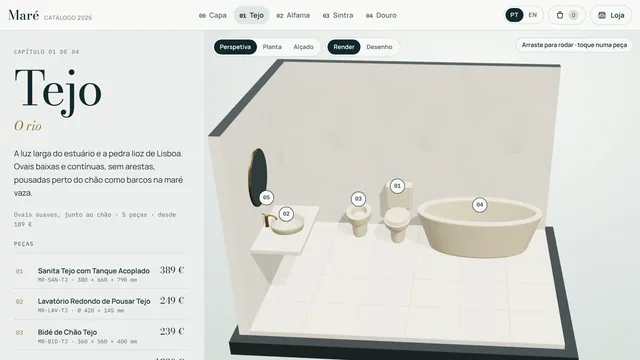
The same product can reach customers in a web catalogue with 3D and data sheets, and reach designers in an easy-to-browse Revit library.
 FILTER → VIEW IN 3D → DOWNLOAD
A manufacturer catalogue in two modes: the shop, with filters, finishes, 3D view and downloads, and the catalogue, with each collection set in a bathroom in perspective, plan and elevation.
Try the 3D CatalogueFictional brand, products and prices. A demo of a custom catalogue.Browse your company's family library with previews, search and filters. Load and place without opening each .rfa.
Learn more and downloadVersion 1.0.0 · Runs on your computer, sends no data.HOW WE WORK
We review the catalogue, data sheets and the variants to model.
We build a pilot family and refine the criteria before scaling the library.
We organise the files and information for designers to use.
Yes. We can start with a selection of products and structure the library to grow later.
Yes, when it makes sense for the product. Types and parameters are organised around the real variants in your catalogue.
The library and the explorer can be part of the same solution. The integration and features are defined for each company.
LET'S TALK ABOUT YOUR PROJECT
Tell us what you need. We look at the context and agree the next step with you.
geral@nortecad.pt +351 938 853 074Call to a Portuguese mobile number