01
Repetitive tasks
Renaming, numbering, duplicating, cleaning up. The operations your team repeats every week become a single command.
Examplenumbering every sheet in a project to the company standard.
For teams working in Revit
If your team repeats the same clicks every week, that can become a tool. We build Revit commands around your rules: rename, fill in, check, generate and export.
WHAT WE CAN BUILD
If the team repeats the same clicks every week, that can become a tool. We study the process, the rules and the exceptions, and build the command that does the work.
Renaming, numbering, duplicating, cleaning up. The operations your team repeats every week become a single command.
Examplenumbering every sheet in a project to the company standard.
Fill in, copy and check parameters on hundreds of elements at once, from the model or from an Excel sheet.
Exampleimporting item codes from Excel into doors and windows.
Views, sheets and schedules created in batches, and data exported in the format you need.
Examplecreating one sheet per room, with the right view and schedule.
Families and tools that generate geometry from your design rules.
Examplea cabinet that fits the available width and adds its own doors.
A custom tool follows your company's rules and does it the same way every time.
TASK EXAMPLES
Some typical examples. Your tool starts from the task that takes your team the most time, with your company's rules.
One by one, checking the standard on every sheet.
One company rule applied to the whole project.
Copying values element by element.
An import that flags missing codes.
Duplicate, adjust, align, repeat.
Generate them all from a list of rooms.
A visual review, hunting for errors.
A report of empty parameters and non-standard names.
Export, then tidy the file in Excel.
A formatted file, ready to send.
Show us how you do it today and the result you want.
Talk to us about a taskTOOLS TO TRY
A Revit extension you can install today, and a pattern generator in your browser. Your tool can follow your own rules.
Browse your company's family library with previews, search and filters. Load and place without opening each .rfa.
Learn more and downloadVersion 1.0.0 · Runs on your computer, sends no data.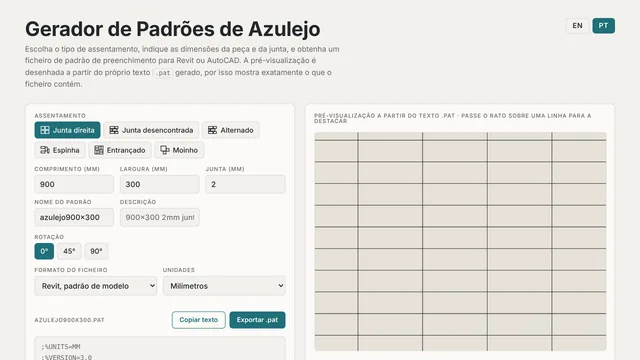 TILE + JOINT → .PAT
Choose the laying pattern, set the tile and joint sizes and download the .pat file. See the result as you go.
Try Tile Hatch BuilderFiles generated in your browser. No extension to install.HOW WE WORK
Share an example of the current process and the result you expect.
We build the tool and validate it with representative examples.
We fit it to the environment and the team agreed in the project.
No. We need to understand how you do the task and the result you want.
We can assess the existing tool, access to its code and its compatibility with your environment.
Feasibility depends on what Revit allows, the data and the rules of the process. We assess this in the first conversation.
LET'S TALK ABOUT YOUR PROJECT
Tell us what you need. We look at the context and agree the next step with you.
geral@nortecad.pt +351 938 853 074Call to a Portuguese mobile number